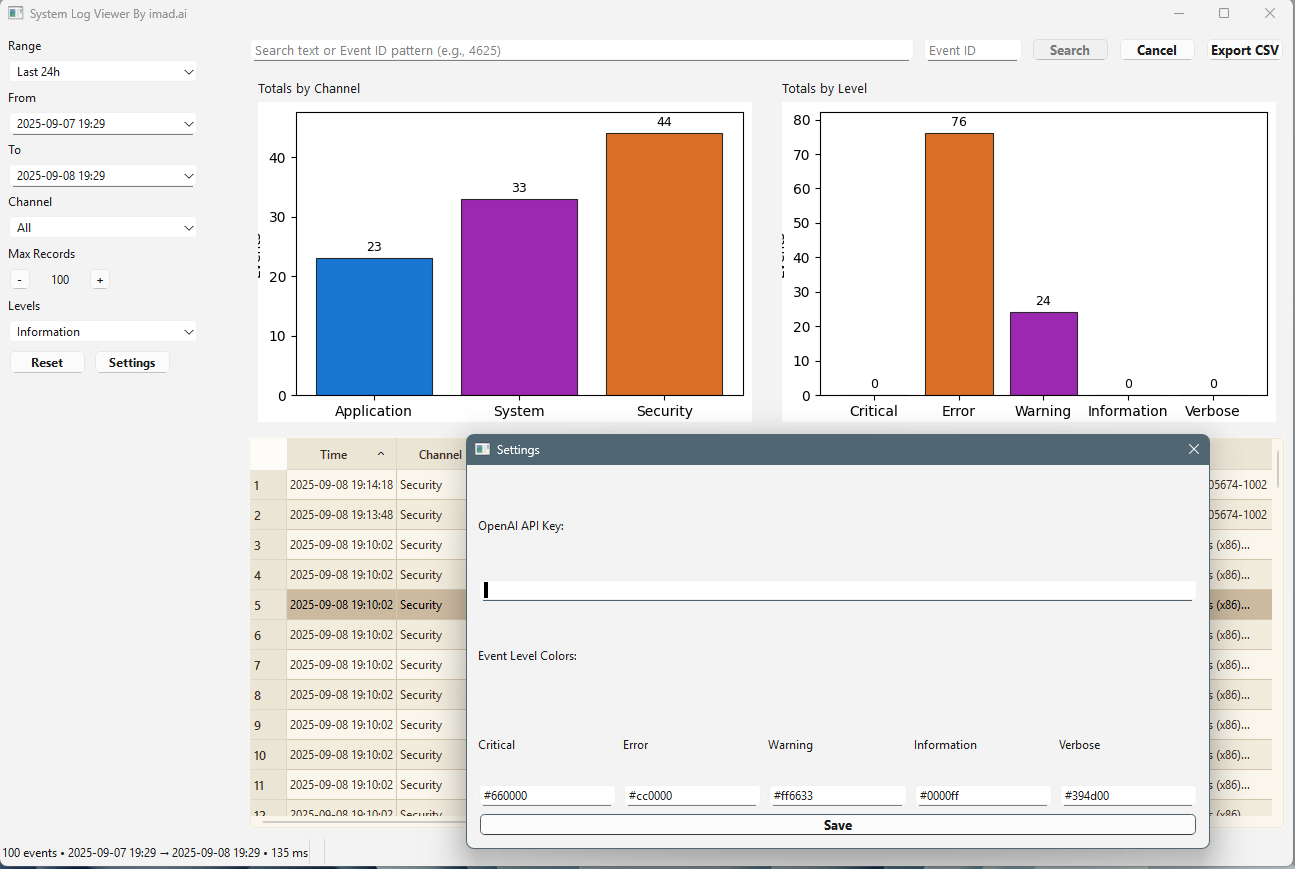
In IT, the foundation of effective troubleshooting is having enough and accurate data. Without clarity in logs, even the most experienced engineer ends up guessing. That’s why I built a custom Windows Event Viewer app — designed not just to display logs, but to help interpret them.
Key Features
• Clean, modern interface with quick filters (channel, level, date range).
• Visual charts to spot trends at a glance.
• Color-coded event table with fast search and Event ID lookup.
• Export options for collaboration.
• AI integration that:
• Summarizes events in plain English.
• Suggests probable causes and fixes.
• Highlights anomalies and recurring patterns.
Why It Matters
Accurate data leads to faster, better decisions. With AI built in, my app transforms raw event logs into actionable insights — reducing downtime, improving response time, and making troubleshooting a proactive process instead of reactive firefighting.
Tech Stack
• Python + PyQt/PySide for the UI.
• pywin32 for direct log access.
• Matplotlib for visualizations.
• AI assistant for intelligent analysis.
As IT leaders, our role is not just to solve problems but to empower our teams with the right tools and the right data. This project is one step toward smarter, data-driven troubleshooting.
All posts
Imad's Blog
Documenting projects, sharing lessons learned.
Reading Style
Smarter Windows Event Viewer with AI
 By Imad
All websites and desktop applications shown here are intended for personal or light business use.
For production-level or custom business software, please contact me directly.